Pricing
Plan your writing, not your wallet.
Choose the plan that matches your process, from getting started to full-scale series planning.
Best for: Planning one book at a time.
Free includes:
- 1 active project
- Sample Series Workspace preview
- Up to 50 active cards per project
- Up to 5 active Worldbuilding entries per project, shared across Location and Lore
- Worldbuilding Identity, World Detail and Visual reference sections
- Full Story view across your project
- Core planning features
- 500MB storage for images and files
Upgrade to Pro anytime without losing your existing project data.
Best for: Active novelists building one or more books each year.
Pro includes:
- Unlimited projects and cards
- Unlimited Worldbuilding entries with all sections unlocked
- Unlimited Series Workspaces and cross-book planning
- Project and series import and export
- 10GB storage for images and files
- Manuscript storage vault
- Advanced Story Map views for Characters, Plots, Structure and Series
- All premium planning features
- Save with an annual plan
- Cancel anytime
Best for: Career authors planning multiple books over the long term.
Lifetime includes:
- Everything in Scryla Pro
- No recurring billing ever
- All future updates included
- Complete Series Management for every future series
What's included
Tools that scale with your writing process.
Start for free, and only upgrade to Pro or Lifetime when you need unlimited projects and series, advanced planning tools, and full export flexibility.
Scryla is designed to grow with your writing process, from your first book to a full catalog. If you don't need the advanced features yet, you can start for free and upgrade later without losing your existing project data.
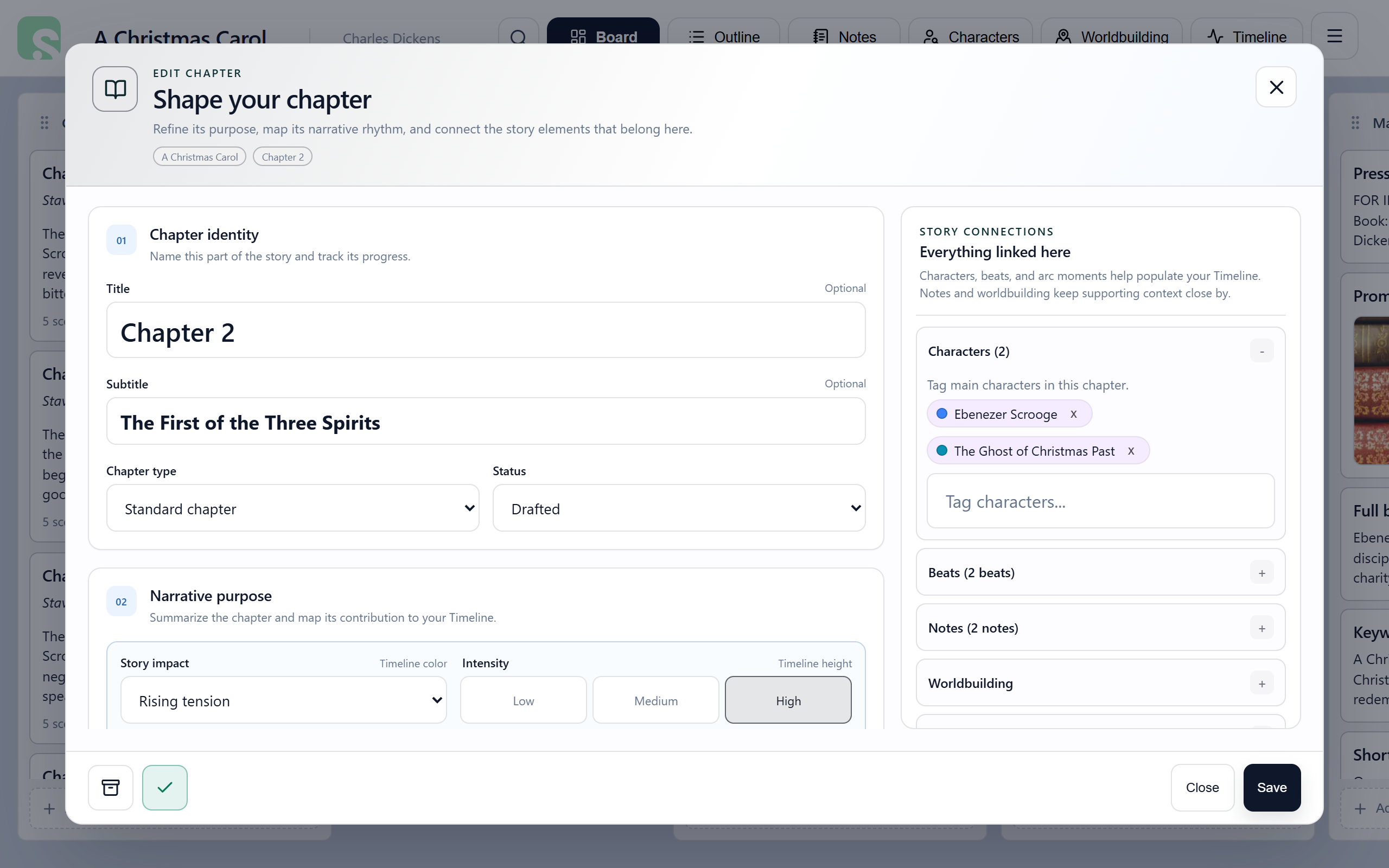
Add, modify and rearrange chapters with ease.
Chapters, beats, notes, worldbuilding and characters in one focused workspace.
Drag-and-drop story structure with clear visual layers for chapters and scenes, plus full series management.
Manage cross-book frameworks, threads, setups and payoffs, character journeys, canon, continuity, shared worldbuilding, and marketing in one dedicated workspace.
New features and improvements are included as they are released.
FAQ
Common questions
What does one active project mean?
An active project is a project you haven't archived. On Free, you can create or restore a project when you have no active projects. Books linked to a series count towards the same allowance.
Archive your active project to make room for another, or upgrade to Pro or Lifetime for unlimited active projects.
What if I already have several projects on Free?
Your existing projects stay accessible and editable. We won't delete or automatically archive them because you have more than one active project.
To create or restore another project on Free, you'll need to have no active projects. You can also upgrade for unlimited active projects.
What Worldbuilding features are included in Free?
Free includes up to five active Worldbuilding entries per project, combining Location and Lore. For example, three locations and two lore entries use all five slots. These entries also count towards your 50 active cards per project.
Identity, World Detail and Visual reference are available on Free. Pro and Lifetime unlock Location or Lore connections, Story connections, Organisation and Supporting assets, with unlimited entries. Your plan's file storage limits still apply.
Can I make room for another Worldbuilding entry?
Yes. Archiving an entry frees a slot. On Free, you can add or restore an entry when the project has fewer than five active Worldbuilding entries. Entries added from a series use the same allowance.
What happens to my existing Worldbuilding entries?
Entries created before these Worldbuilding restrictions were introduced retain full editing access, including their connections, organisation and supporting assets. Nothing is deleted or automatically archived, even if you already have more than five active entries.
Those entries still count towards the five-entry allowance. New entries on Free have the paid sections locked; to add or restore another entry, first bring the active total below five or upgrade.
Which Story Map views are included on Free?
The Story tab shows the whole project within your existing card allowance. Follow chapters, scenes and story events, open the source material, and rearrange the story.
Pro and Lifetime unlock the Characters, Plots and Structure tabs, plus Series for books linked to a series. Free projects can preview each paid view with sample content.
Will my existing project keep its Story Map access?
Yes. Projects created before the Story Map plan change keep full access to their Story Map views, including on Free. Projects created after the change follow the current plan rules.
Can I create a series on Free?
Creating a Series Workspace requires Pro or Lifetime. On Free, open the Series tab to preview two linked books, a shared character, and a setup that pays off in the second book.
Can I still edit a series I created on Free?
Series that were already on Free when Series Workspace creation became a paid feature retain editing access. Your existing books remain accessible, and the Free active project allowance still applies when you create or restore a book. Creating another Series Workspace requires a paid plan.
What happens to my work if I cancel?
When your paid access ends, your account returns to Free. Your existing projects stay accessible and editable, subject to the Free plan's other limits.
You can create or restore another project once you have no active projects, or upgrade again for unlimited active projects.
Worldbuilding returns to the Free allowance and section access. Entries that predate the Worldbuilding restrictions keep their full editing access; other entries retain their content, but their paid sections are locked until you upgrade again.
Your Story Map work stays in your project. Projects created after the Story Map plan change return to the Free views when paid access ends. Projects that predate the change retain full Story Map access.
When paid access ends, your paid Series Workspaces become read-only. You can still review your series and open its linked books. Upgrading restores editing and book linking. Series with preserved Free editing access stay editable.
You can export your Scryla data at any time from your Account controls.
Can I cancel anytime?
Yes. You can cancel your subscription at any time.
Your plan will remain active until the end of your current billing period.
Do you offer team plans?
Team and collaboration features are planned.
We will introduce studio-style plans once shared projects and co-author workflows are ready.